More of your marketing, done for you.
This is one of our biggest Spectre updates yet. AI now builds fully designed, on-brand emails for your automated journeys and newsletters. ESTAS reviews work across every Spectre product. TikTok sits alongside the rest of your socials. And your website asks better questions, shows local stock on area pages and fills its own SEO gaps.
Around that, the teams took the fiddly jobs off agents' plates: Smarter linking, QR codes in one click, logos fixed without a designer, a locked-in mail exclusion period and rebuilt lettings prospect pages.
Here's everything that's new in Spectre…
Spectre Email updates
Emails that write and design themselves.
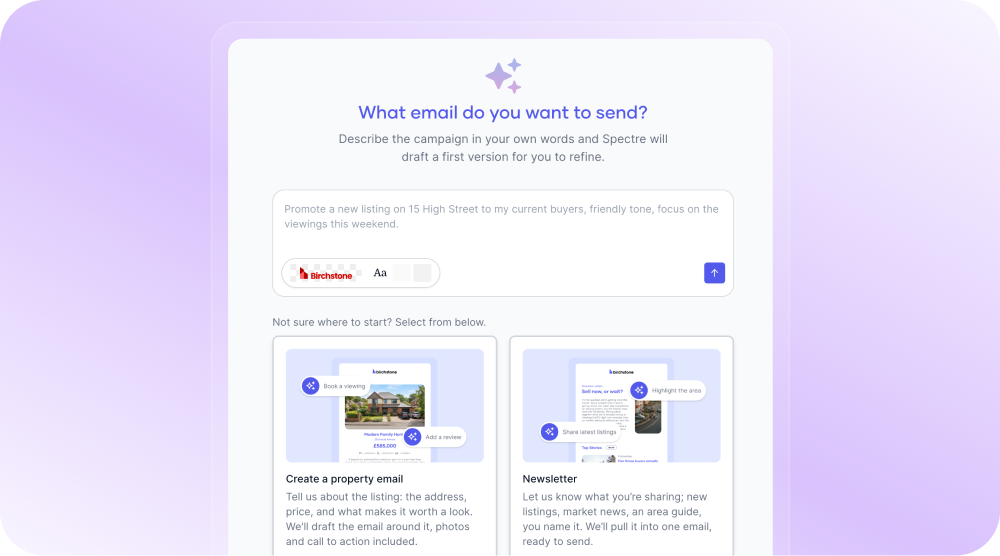
The AI Email Builder now powers automated journeys. Choose your brand and every email in the journey is generated fully styled, with images and accent colours, ready to refine with the AI Email Editor or switch to drag-and-drop in one click.
Answer a few questions. Get a finished newsletter.
Choose the newsletter flow in the AI builder and Spectre runs a short interview about what you want to cover, with suggested answers at each step. It then builds a branded, designed newsletter from your answers. Refine it in the chat, or open it in the full editor for finer control.
Every campaign checked before it sends.
Spectre Email now checks every campaign before it goes. If a merge field isn't recognised in the subject, preview text or body, or the footer still shows a placeholder address, the campaign stays in draft until it's fixed.
Marketing suite updates
Your ESTAS reviews, everywhere you market.
Connect your ESTAS account once in Company Settings and use your reviews across Websites, Social, Email and Property Reports, alongside your Google reviews. Websites get a new ESTAS-branded reviews section, Social can post ESTAS reviews and use them in automations, Email gets a drag-and-drop review block, and Property Reports can import reviews straight into About Us. The "See all our reviews" link now points to your ESTAS page automatically, and AI review approval now works across every product.
The right access for every team member.
Spectre now supports custom roles, built from 35 individual permissions across Print, Social, Email, Websites and Property Reports. Give someone access to exactly the parts of Spectre they need, without handing over a whole admin role. Anyone without a custom role keeps the access they have today.
Fix your logo without a designer.
Create logo variants right inside Brand settings. Crop, cut out a flat background and recolour to black, white, your brand colours or a custom colour, then save the result as a new logo. Set any variant as your rectangular or square logo in a couple of clicks.
Connect your videos once. Use them everywhere.
YouTube and Vimeo are now connected once in Spectre ID and shared across your products. Pick videos from your connected accounts in Property Reports and Blogs, as well as the website editor. Existing connections have moved across automatically, so nobody needs to reconnect.
Spectre Social updates
TikTok, scheduled alongside everything else.
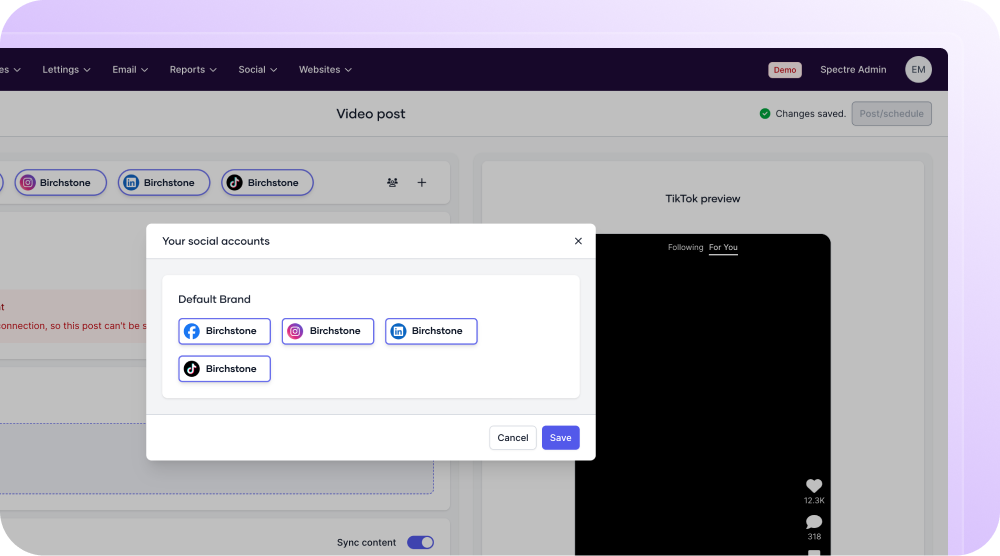
Connect your TikTok account to Spectre Social and create and schedule posts to it, right alongside your other platforms. TikTok settings appear in a short pop-up when you post, with a clear choice between promoting your own brand and a paid partnership, so your own posts keep their reach.
More social improvements:
- Property Marketing Preferences now open newest first, with a sortable Listed column, so choosing which current listings go out on social takes seconds.
Spectre Website updates
Contact forms that ask the right questions.
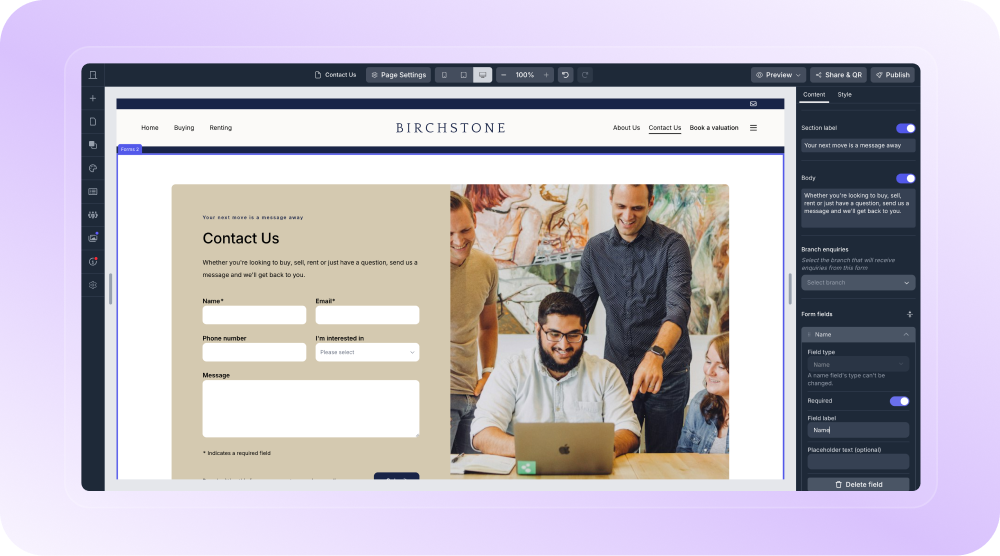
Add your own fields to your website contact forms: short and long text, email, phone, single select and multi-select, each with its own label, placeholder and Required toggle. Drag to reorder, and give a vendor page and a buyer page different questions. Answers travel with the enquiry to the Websites Enquiry Centre and through to Street.
Local stock on every area page.
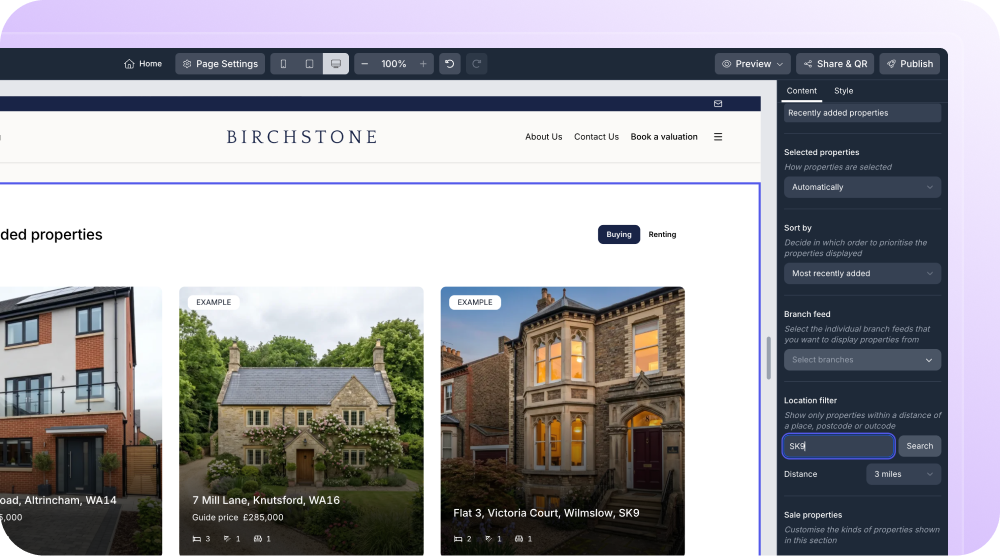
Property Feature sections can now be filtered by area. Type a postcode or place name, choose a distance, and the section shows only properties nearby, keeping itself up to date as stock changes. You can also filter by property type, so a page can show just commercial or just residential stock.
Your site's SEO gaps, filled automatically.
Spectre Websites now writes image alt text and page meta descriptions with AI wherever you haven't. New images get alt text as you add them, and on publish, any missing alt text or meta descriptions are filled in and flagged so you can review them.
Every link stays on your site.
Linking to your own content is now a pick, not a paste. Add a link in a blog post and choose any page on your website from a search. And link to the same page more than once in your menu, so it can sit in the main navigation and under a dropdown without creating a duplicate page.
Your website, one scan away.
Generate a QR code for your website straight from the editor with the new Share & QR option, the same way you already can for Property Reports. Put it on window cards, boards and print ads without reaching for an outside tool.
More website improvements:
- Choose how many links show in your header, from 3 to 8 or no limit
- Share buttons on every property page, so buyers and tenants can send a clean link to a partner or friend
- Add an icon to any section button from a searchable library, placed left or right of the text
- Choose Primary, Secondary or Text Only styles for the main button in Hero Header 2 and Hero Header 5
- Edit how your branch address reads on the Branch Map, with the map pin staying exactly where it is
Spectre Sales and Print updates
See what your prospecting is really worth.

The Sales successes page now matches Lettings, with the same layout, filters and influenced instructions table. Two new metrics show market appraisals booked and estimated total fee value, alongside total listing price value. For Street customers, appraisals pull straight from Street.
Stop mailing the same homes twice.
Admins can now set a default "exclude recently contacted properties" period of 7, 14 or 28 days, or any custom period up to a year. Once it's on, every Sales and Lettings campaign has the exclusion ticked and locked, with an Admin default badge so branches know why.
More print improvements:
- Switch branch and stay on the page you're working on, so multi-branch groups can run Send Mail across every branch without starting again each time
- Property page activity now shows the type of send, the template name and a link to the campaign that went out, instead of a generic "Campaign" row
- The estimated value on Anniversaries inserts now matches the value on your Property Reports, so the figures homeowners see always line up
- Reapit connections are now set up once for the whole company, so lettings customers get landlord data flowing faster
Spectre Lettings updates
Work through your prospects faster.
The On-Market and Tenanted properties pages have been rebuilt. Filters now sit as chips above the table, each applying on its own and showing its value. A new Known column shows when you hold the landlord's details and where they came from, and Street agents can click straight through to the property in Street. Every column is sortable, availability shows as a coloured badge, and Export follows your search and sort.
October brought AI deeper into Spectre Email, put trusted reviews into every channel and gave agents more control over their website, their brand and their mail. Smarter marketing, with less of the admin that gets in the way.
We'll keep building tools that help you win more instructions.
Follow us on LinkedIn for the latest releases, walkthroughs and product insights.